
A rep goes straight from one call into the next with thirty seconds to pivot, from a renewal check-in to a brand-new discovery call, and no time to prep for either. A manager finds out the forecast slipped only after logging in to check, days before the number is due to leadership. A RevOps leader is still piecing deal history together from memory and spreadsheets, because Dynamics never had the full story on its own.
None of these are tool problems. Each one is an answer that existed somewhere, just not where the person who needed it was standing.
That's the idea behind everything in this release: the answer shouldn't require a trip. It should already be where you are, before you knew you needed it.
Never Walk Into a Meeting Cold
Meeting intelligence already exists in Backstory. It's just scattered across email digests, Slack alerts, the Account page, the Opportunity page, with no single home pulling it together before a call.
My Meetings in Backstory Sheets gives your day a launch pad.
- Walk in prepared. Deal stage, amount, close date, the account or deal summary, and flagged risks, all there before you dial in.
- Know who's in the room. Every participant matched to the account or opportunity, their role in the process, current engagement level, and what they care about. A true 360 on every person joining the call.
- Stop searching. Just ask. "Have we met with procurement?" "Is a competitor engaged?" Get answers on the account or opportunity straight from Backstory's assistant, right on the meeting page.
- Own your next steps. Post-meeting insights, previously buried a few clicks deep, are now front and center, so follow-up happens while the deal's still warm, not two meetings later.
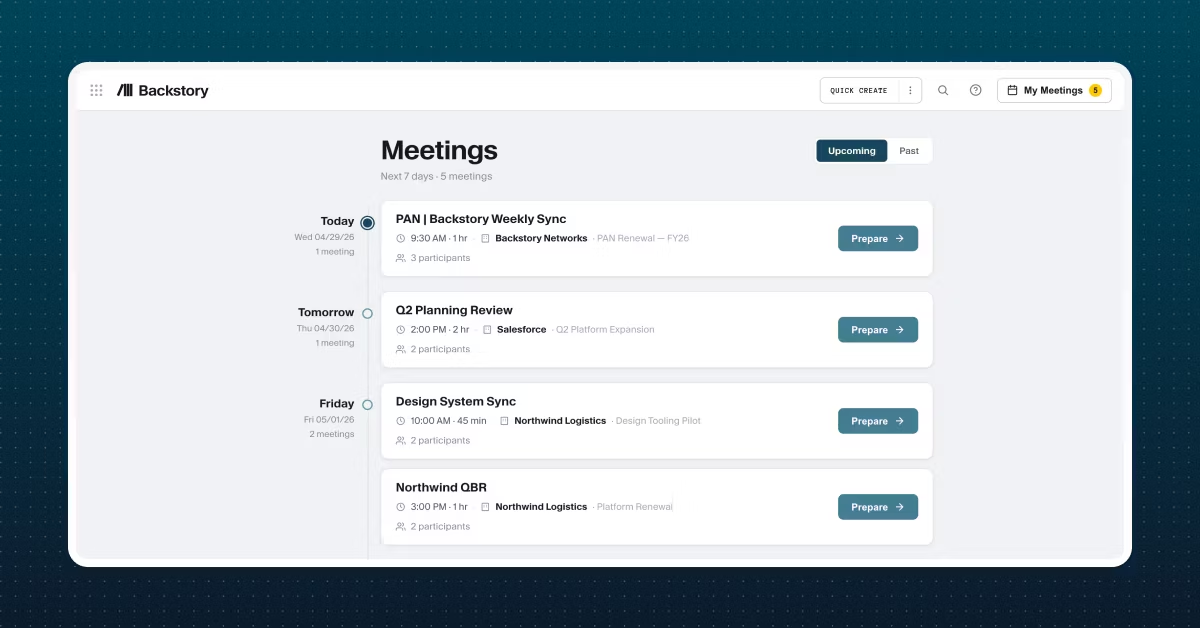
Your meetings are make-or-break for advancing deals. Now they're also the easiest to walk into, no matter how long it's been since your last engagement.
Your Forecast Shouldn't Surprise You
Forecasts don't hold still. They climb and drop all week, and most leaders don't find out how much until they check, often after it's too late to act on what changed.
The Weekly Forecast Trends email flips that. Instead of hunting for the change, it finds you, with time to act.
- See the move before you go digging for it. A weekly email shows how your forecast changed since last week, in dollars and percent, so you know at a glance whether it's a real swing or just noise.
- Catch risk while you can still act on it. The rollup can look flat while a rep is quietly slipping inside it, now you catch that before it becomes next week's miss.
- Get to the deals in one click. Click "Review Deals" straight from the email to open the drill-in view, so you know what to act on while there's still time to do it.
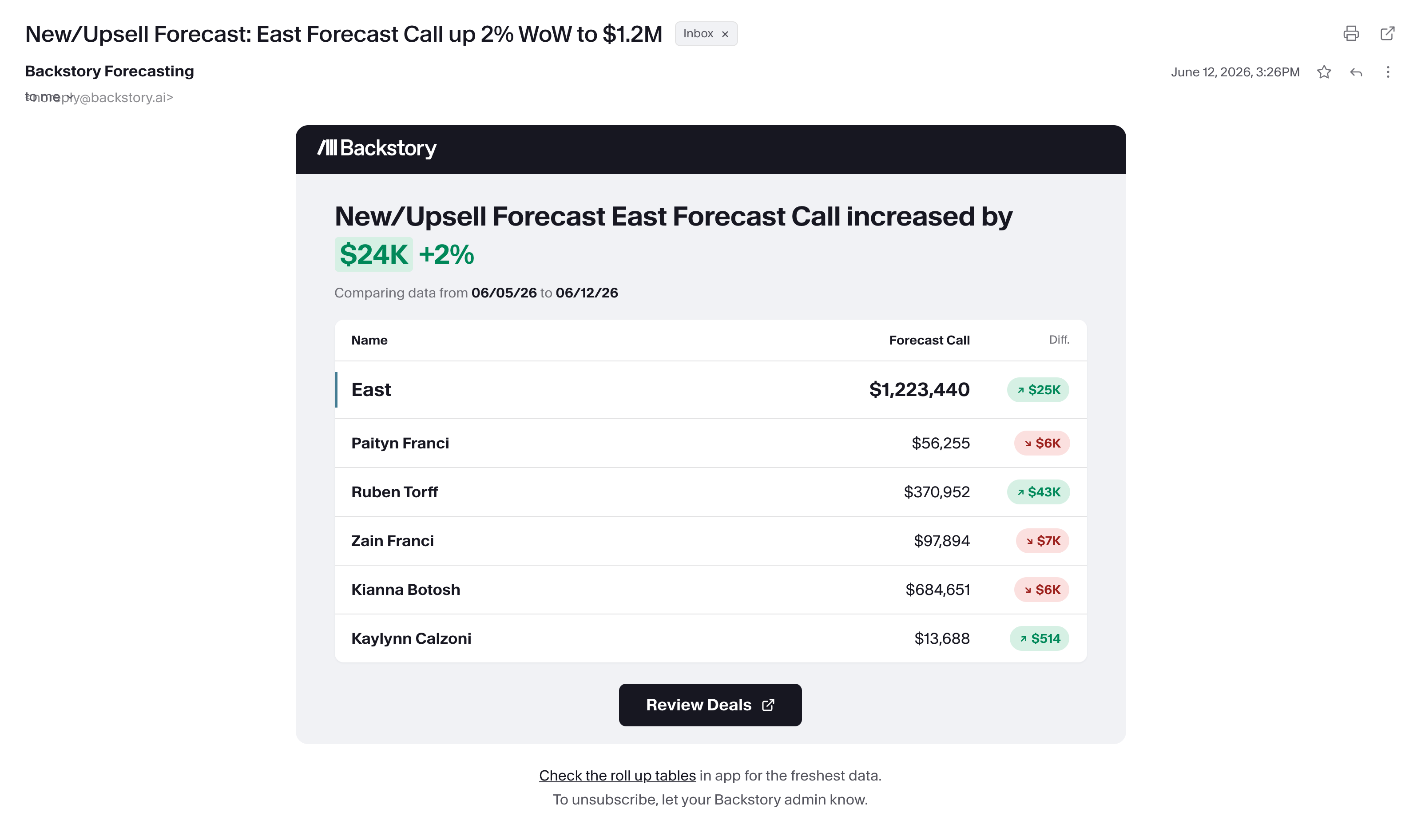
You find out your forecast moved the moment it happens, not the next time you happen to check.
The Answer Was Never in Dynamics. Now It Is.
Dynamics teams have been managing pipeline with half the picture: no deal history, no relationship context, nothing beyond whatever got logged by hand. This release closes more of that gap.
Backstory now supports Microsoft Dynamics, bringing deal intelligence directly into the CRM you already run on.
- See it all without leaving Dynamics. Account and opportunity summaries, complete with recent topics, potential risks, and next steps, plus Engagement Dashboards for accurate reporting on account, opportunity, and team engagements.
- New contacts, already filled in. Contacts discovered in your team's activity get created in Dynamics automatically, enriched with contact and persona data, recent engagements, and what's coming up next.
- Go live on your own timeline. Admins configure the Dynamics integration directly in the Admin Panel, no engineering ticket, no waiting on us.
No new tab, no exporting data to piece the story together. The visibility your team has been missing is right where you already work.
P.S. Situation Search now works at the account level, not just deals. Ask what's happened across an entire account's history, not just a single opportunity. We've also sharpened how it searches and what it returns, based on feedback from users like you.
The answer you needed was already in your data. This release just made sure it found you first.
Want to see any of this in action? Existing customers, reach out to your Customer Success Manager. Not a customer yet? Schedule a demo and see it for yourself.
Related Insights
Explore more expert insights on AI adoption, sales execution, and revenue intelligence to help your team close more deals with confidence.






See Backstory in action,
no meeting required
See the platform for yourself, or get the guide to help you evaluate it.