
.avif)
Four free sales call spreadsheet templates for Excel, reviewed: leads and prospects, call tracking, daily and weekly activity, and pipeline. Plus how Backstory Sheets keeps the tracker and Salesforce in sync without manual exports.
Looking for a sales call spreadsheet template? Four free options are reviewed below, with what each one tracks. Every one of them also creates a second system you keep in sync with Salesforce by hand, and that sync is the real cost of a tracker. Backstory Sheets removes it: a spreadsheet-style view that reads and writes directly to Salesforce, so you get the speed of Excel without the copy-paste.
Your Salesforce was pre-configured with point-and-click permissions. This setup was okay when all you needed was to update and create a handful of records.
Not anymore.
Alas, the accounts, opportunities, etc., managed in your deal pipelines have increased, which is good. Slowly, you've realized Salesforce isn't as perfect as you thought. Updating records has become a time drain. And worse, tracking your daily or weekly sales activities is now a problem.
Sounds familiar?
Well, it happens to the best salespeople.
For one, Reps and Account Executives usually don't have permission to customize Salesforce. Even with permission and the IT skills, you'd spend that time selling.
Enter Excel sales tracking templates.
But before we jump in…
Are Excel Sales Tracking Templates Worth It?
The answer sits somewhere between yes and no.
Compared to Salesforce, Excel is a better option as you don't need permissions to customize it for visualizing and creating sales reports relevant to you. For this, yes, excel sales templates work well.
Unfortunately, Excel templates aren't great for tracking daily, and weekly sales pipeline activities while also ensuring your Salesforce pipeline stays updated.
It's for this reason reps turn to sales productivity tools like Backstory Sheets.
Take Peter H., a Senior SDR:

[Backstory Sheets review on G2]
We'll explore top excel templates used by salespeople in this post.
You'll also see how to automate sales and pipeline tracking with Backstory Sheets, a tool that expedites updating Salesforce records in a spreadsheet-like view:

What's the Best Sales Tracker Template for Reps?
The best sales tracker template is the one you'll actually keep updated. For most reps that means a simple, pre-built layout, not a custom build from scratch. The four templates below (leads/prospects, call tracking, daily/weekly activity, and pipeline activity) cover the workflows reps track most, and each is free to download. The tradeoff: every one of them lives outside Salesforce, so someone still has to move data back and forth. Backstory Sheets removes that step by syncing a spreadsheet view directly with your Salesforce records, so the "tracker" and the CRM are the same data, updated once.
4 Sales Activity Tracking Excel Templates (& How to Automate them)
Sales is a process comprising steps.
Across those steps, from prospecting to closed-won, reps use the spreadsheet templates below to track specific sales activities.
1. Excel Leads & Prospects' Tracking Template
The formatting of this free Excel template by HubSpot gives a simple way to track leads and prospects in your pipeline (download it here):

As new leads and prospects get added to your Salesforce pipeline, they don't go into the spreadsheet automatically. You must add them to the spreadsheet one by one, which is extra work.
Backstory Sheets eliminates this manual work.
You get an always-updated sheet of all your prospects and leads added on Salesforce. You'd also have them automatically synced to the Accounts & Opportunities you manage:


2. Sales Call Spreadsheet Template
Virtual selling is on the rise.
And with it comes more calls & online meetings for reps to plan for and track. This sales call spreadsheet template by SalesHacker (downloadable here) does both well:
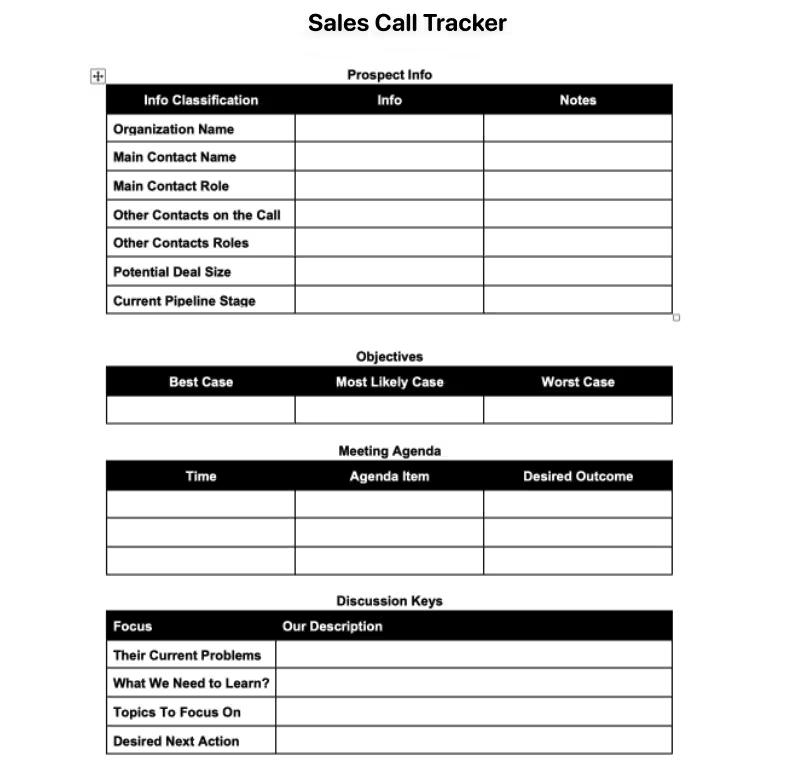
To track sales calls without jumping back and forth to update Salesforce, use Backstory Sheets instead. You can update call status, assign calls to Accounts, update next steps, and even add notes after calls in a few clicks.
3. Daily & Weekly Excel Sales Activity Tracking Templates
An excellent way to improve your sales performance is to track your daily and weekly sales activities. For this, SmartSheet's Excel template (download here) can help:

A problem with using this template.
To track your daily, weekly, and monthly sales activities, you must import data from your CRM into it daily, weekly, or monthly. The result of this is siloed spreadsheets with disjointed data.
Backstory Sheets solves this problem.
By default, Backstory Sheets brings all sales data in your Salesforce instance into an Excel-like window. With this, you can filter sales activities by day, week, or any range you like, without manual data exports.
4. Sales Pipeline Activity Excel Template
SalesHacker created this free Excel template.
Writing about it, Matt Smith, Founder of Full Stack Sales, called it “a basic pipeline tracker spreadsheet to help you get a 10,000-foot view of your pipeline for each quarter.”

According to Matt, you can also use this template to generate sales forecasts and weight forecasts by probability using different Salesforce funnel stages.
However, doing all that begs a crucial question…
Sales Rep Tracking Spreadsheet vs. Automated Tracking
A sales rep tracking spreadsheet works fine as a standalone log, but it breaks down the moment two people need to see the same up-to-date numbers. One rep's Excel file and Salesforce drift apart within days. Automated tracking tools like Backstory Sheets close that gap: reps still get the fast, grid-style editing they like about spreadsheets, but every change writes back to Salesforce in real time, so managers and reps are always looking at the same data instead of reconciling two versions of it.
How Do You Monitor Sales Performance in Excel?
To monitor sales performance in Excel, you typically build or download a template, then manually re-import fresh data from your CRM on some schedule (daily, weekly, or monthly) to keep the numbers current. That manual refresh step is the main limitation: performance snapshots are only as current as your last export. Backstory Sheets replaces the export/import cycle with a live, spreadsheet-style view of your Salesforce data, so performance monitoring reflects what's actually in the CRM at any moment, not what it looked like at last week's export.
Can Excel Sales Templates Pull Data from Salesforce?
Not exactly.
Excel sales templates can't pull in data from Salesforce automatically. You must manually import data into the spreadsheet each time you want to analyze or track something new.
For real-time data pulling, the only workaround is to invest in external Salesforce and Excel connector tools like Hevo. This workflow isn't optimal because it doesn't update your pipeline records back into Salesforce.
In other words, tracking your sales pipeline in an Excel spreadsheet means moving those updates into Salesforce eventually, by copying and pasting.
Salespeople are opting for Backstory Sheets to optimize this workflow.
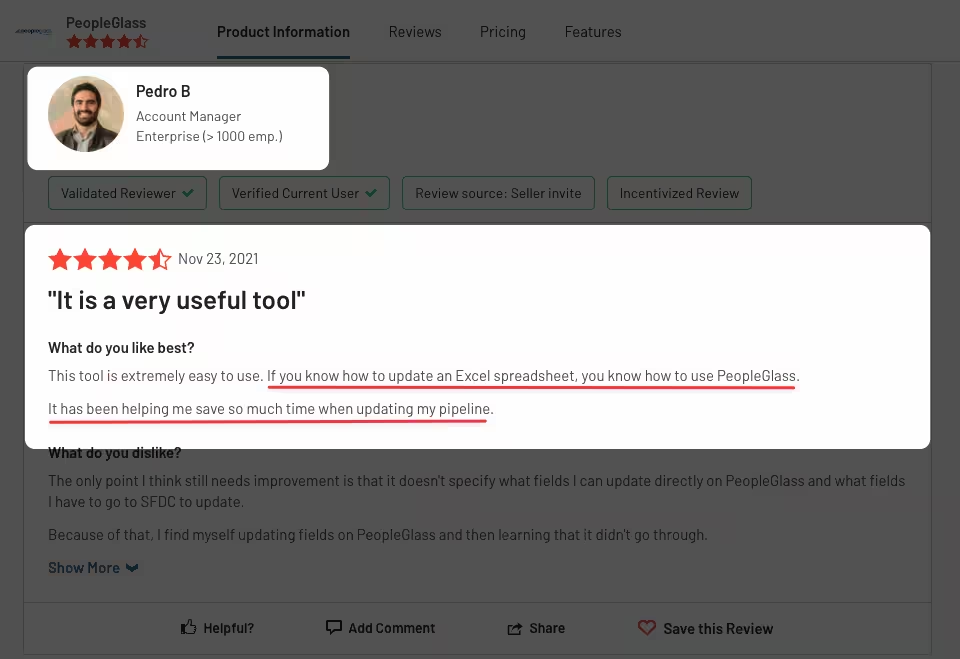
Pedro B., an Account Executive, is one of many:
Save Time & Manual Work, Automate Sales Tracking
Tracking sales activities is a must.
But going through the manual process of importing data from Salesforce into Excel templates is optional. Also, wasting even more time getting updates made in spreadsheets into Salesforce is optional.
You have an option to automate such busywork and save time.
Salespeople are automating that busywork with Backstory Sheets:

Related reading: nine sales tracking tips for monitoring rep activity and deals, how to build a sales rep dashboard in Salesforce, and the 11 sales metrics your team should track.
See how Backstory replaces the spreadsheet with a CRM that updates itself.
Related Insights
Explore more expert insights on AI adoption, sales execution, and revenue intelligence to help your team close more deals with confidence.





See Backstory in action,
no meeting required
See the platform for yourself, or get the guide to help you evaluate it.